

Introduction#
While developing a cross-platform desktop application, I recently encountered a confusing issue:
The same Wails app ran smoothly on Windows, but noticeably lagged on Linux distributions like Ubuntu. The symptoms included stuttering animations and slow UI response. At first, I suspected the Wails framework itself, or that my GPU drivers were not properly installed. After careful investigation, I realized neither of those was the cause.
It turned out that GPU acceleration is disabled by default on Linux in Wails. To make matters trickier, the official documentation only mentions this inside a long code block, without any comments, making it very easy to miss.
This small configuration detail led to a big difference in performance.
In this article, I’ll share my debugging process and provide a practical solution that you can apply directly to fix the issue. Hopefully, it saves you time and frustration.
Environment details:
- OS:
Ubuntu 24.04.3 LTS - Wails:
v2.10.2 - Go:
go1.22.2 linux/amd64 - Frontend:
Vue 3 + Vite
The Solution#
Let’s start with the fix.
Since GPU acceleration is disabled by default on Linux, you need to manually enable it.
Go to your project root and open main.go (the entry point for configuring and starting Wails). Inside the wails.Run() call, add the following:
// main.go
func main() {
    ...

    // Create application with options
    err := wails.Run(&options.App{
        ...

        Linux: &linux.Options{
            WebviewGpuPolicy: linux.WebviewGpuPolicyOnDemand,	//Enable GPU acceleration on demand
        },
    })

}
WebviewGpuPolicyhas three options:
| Option | Meaning |
|---|---|
linux.WebviewGpuPolicyOnDemand | Enable GPU acceleration depending on the Webview |
linux.WebviewGpuPolicyAlways | Always enable GPU acceleration |
linux.WebviewGpuPolicyNever | Disable GPU acceleration |
Choose the one that fits your needs. If you’re curious about why, keep reading.
Background#
When developing my Wails app on Ubuntu, I used Vuetify.js. As soon as the UI became slightly complex, I noticed:
- Choppy UI animations, such as button/card
rippleeffects - Noticeable input delay (buttons reacting slowly after being clicked)
- High CPU usage
After comparison tests, I found:
- The same page ran perfectly smooth in Chrome on Ubuntu
- The same app also ran smoothly on Windows
At first, I suspected:
- Incorrect GPU driver installation on Ubuntu
- A Wails performance issue
Testing GPU Acceleration Impact#
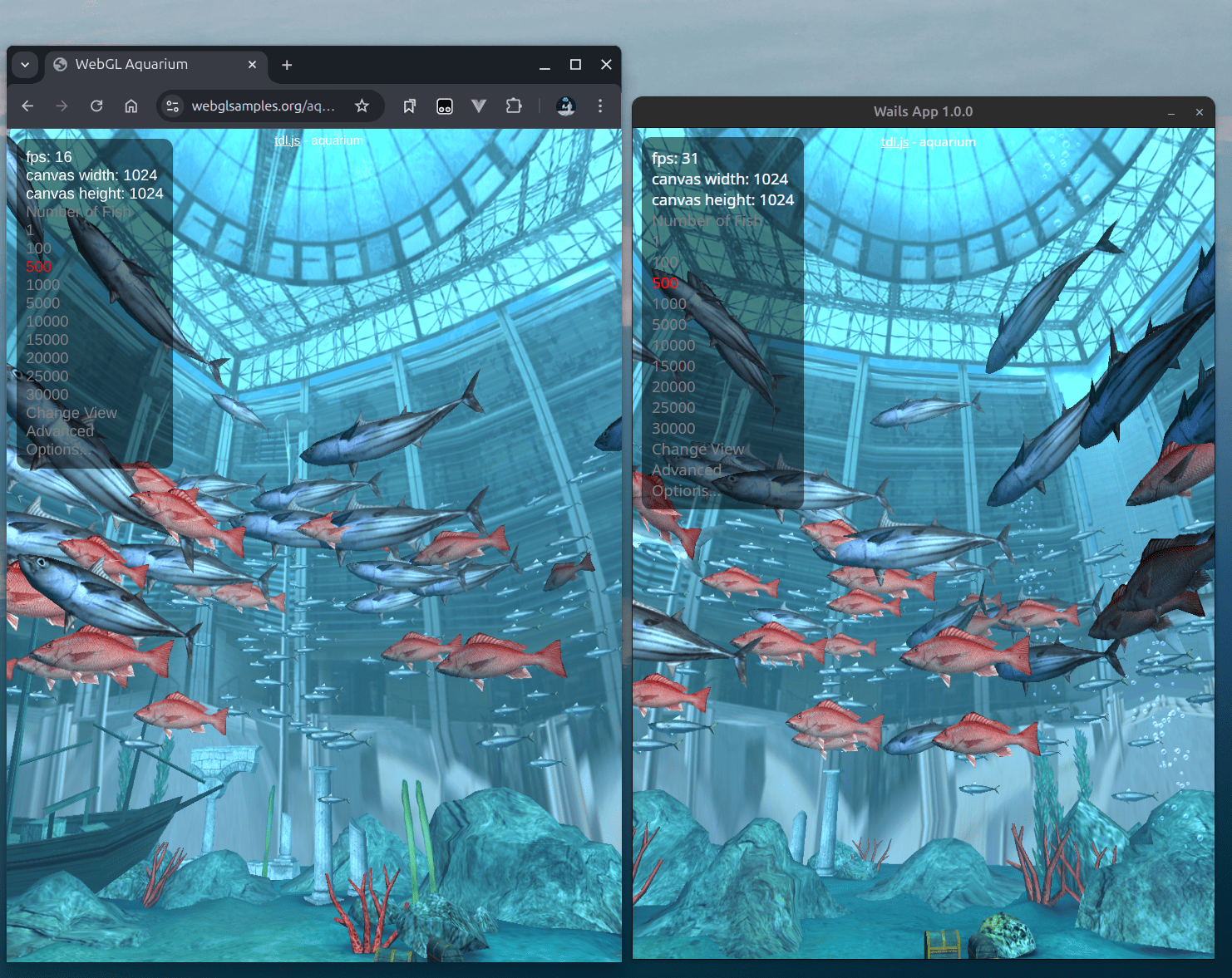
Even with GPU drivers correctly installed, the problem persisted. I used a WebGL test to confirm:
| Environment | Page | FPS |
|---|---|---|
| Wails | Aquarium | ~35 FPS |
| Chrome (GPU enabled) | Aquarium | ~180 FPS |
| Chrome (GPU disabled) | Aquarium | ~15 FPS |
Chrome GPU Off vs Wails#
Chrome GPU On vs Wails#
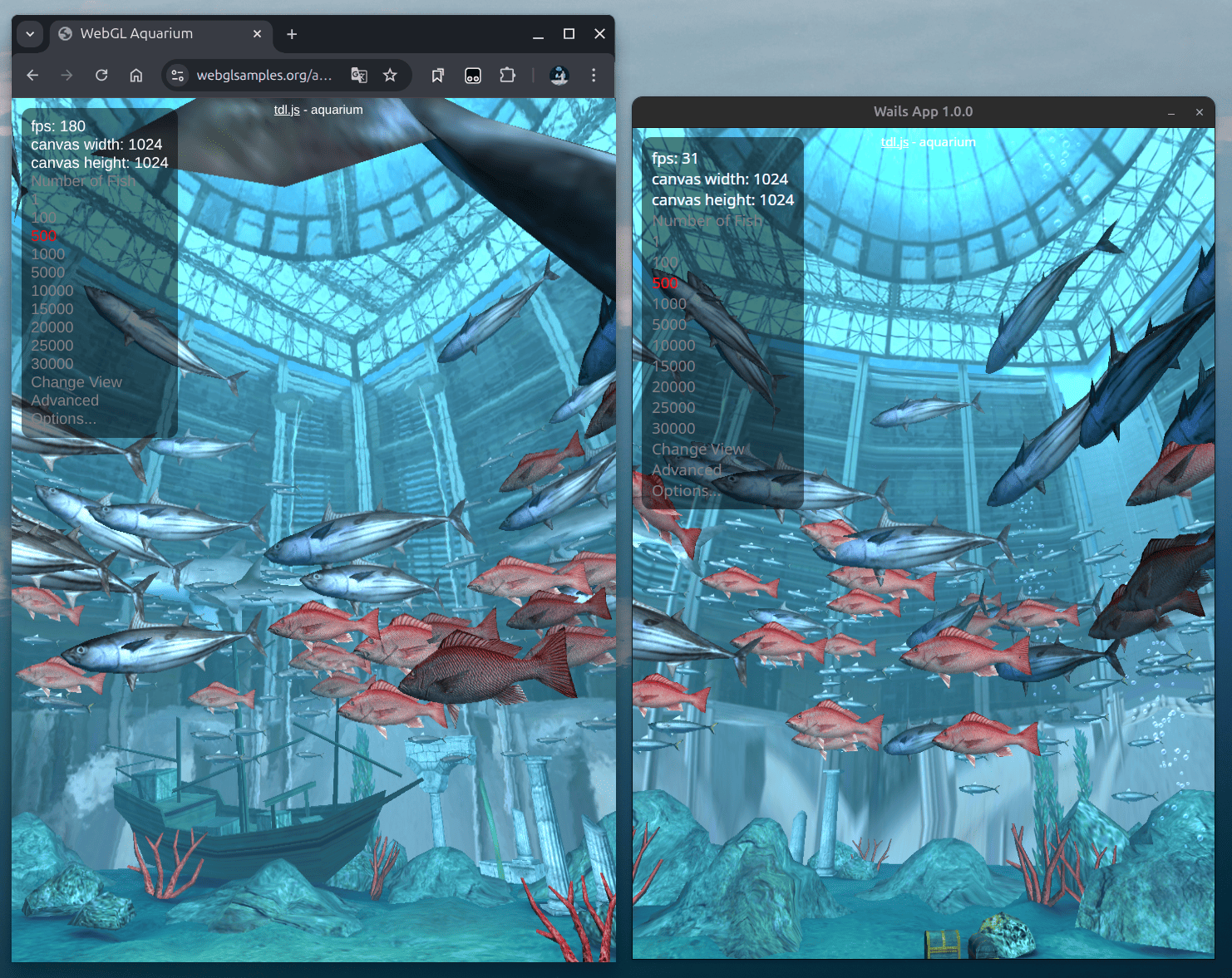
The result is clear: Wails was running without GPU acceleration.
Checking the Official Docs#
Looking into theofficial docs, I found this snippet inside Options.App:
Linux: &linux.Options{
    Icon: icon,
    WindowIsTranslucent: false,
    WebviewGpuPolicy: linux.WebviewGpuPolicyNever, // GPU acceleration disabled by default
    ProgramName: "wails"
},
After changing the WebviewGpuPolicy, the performance improved immediately:
UI animations became smooth, input delay disappeared, and CPU usage dropped — matching the Windows experience.
Lessons Learned#
From this debugging process, I discovered:
- On Linux, Wails disables GPU acceleration by default, while on Windows it is enabled. This can easily cause major performance issues that developers may mistakenly blame on drivers or frameworks.
- Updating
main.goto setWebviewGpuPolicyto linux.WebviewGpuPolicyOnDemandcompletely solved the issue. - You can choose from three GPU policies:
- OnDemand: Let Webview decide whether to enable GPU
- Always: Force GPU acceleration on
- Never: Disable GPU acceleration
Practical advice:
- When developing cross-platform apps, always check for differences in default settings. Performance issues may stem from defaults rather than actual bugs.
- Use WebGL or similar tests to quickly verify GPU acceleration.
- Read the official docs carefully — sometimes the key is hidden in the details.
I hope this article helps you fix similar issues.